Your work, scheduled for you
Stop planning your work.
Just do the next thing.
My Next Thing turns your projects, deadlines and meetings into a day-by-day schedule, so every morning you know exactly what to work on and that it's enough to hit every due date.
14 days free · Cancel anytime
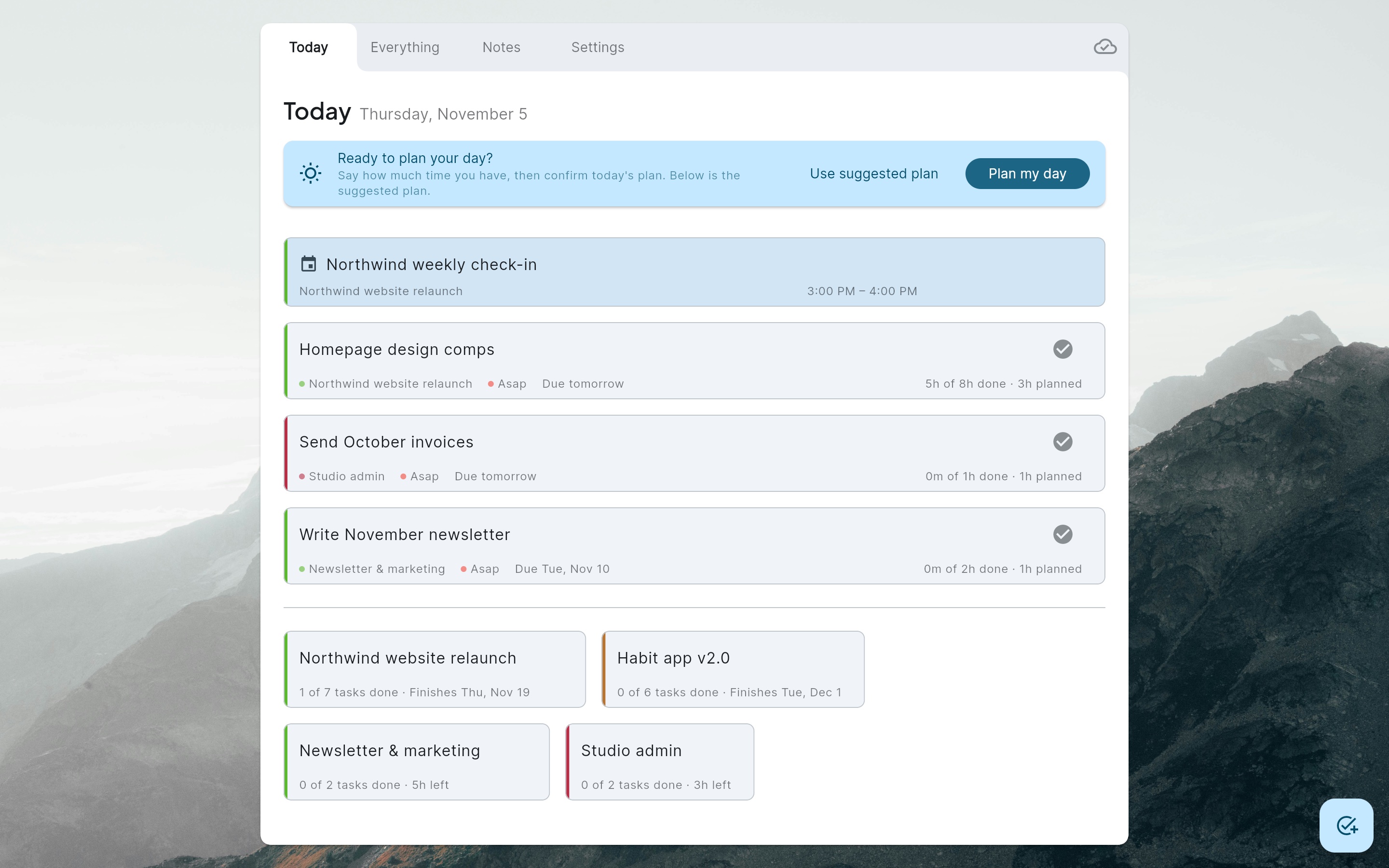
How it works
A to-do list that knows when things will get done
Most task apps give you a long list and leave the scheduling to you. My Next Thing does the scheduling and keeps it up to date as things change.
-
Step 1
Add your work
Projects, tasks with hour estimates and due dates, meetings, recurring chores and days off. Rough estimates are fine.
-
Step 2
Get a schedule
My Next Thing spreads every hour of work across your work days, backward from each deadline, around your meetings and in the right order.
-
Step 3
Plan the day, then do it
Each morning, say how much time you have. Confirm the plan and get to work. Whatever doesn't fit moves to later days for you.
Features
Built for people who juggle more than one project
Freelancers, makers and anyone whose week is a mix of client work, side projects and admin.
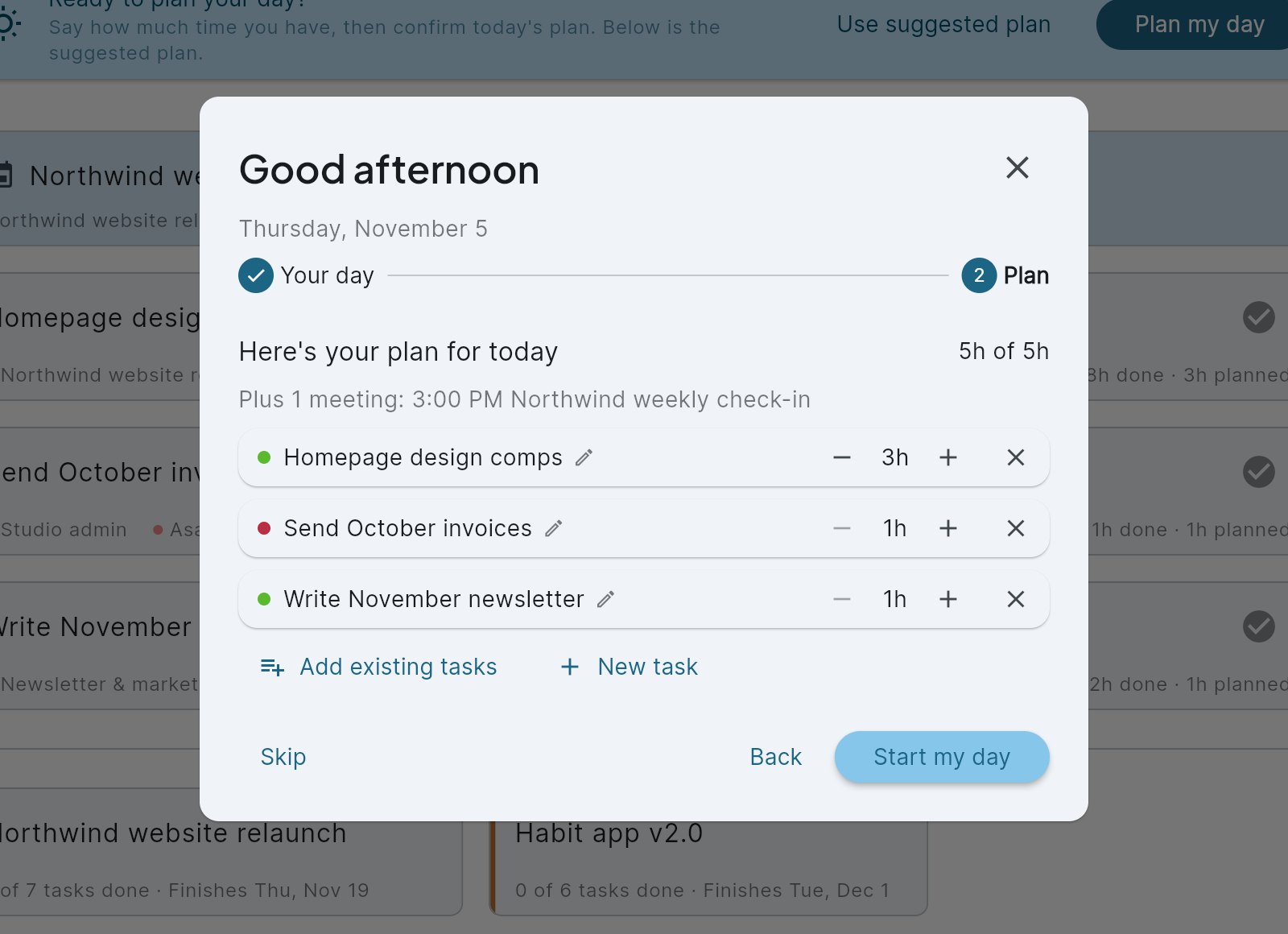
Plan your day in under a minute
Having a normal day, a short one, or taking it off? Tell My Next Thing and it suggests today's plan with meetings already counted. Adjust hours, add or remove tasks, and start your day. The rest of the schedule reflows on its own.
- Fewer hours today? The leftover work moves to later days.
- Meetings take time out of the day automatically.
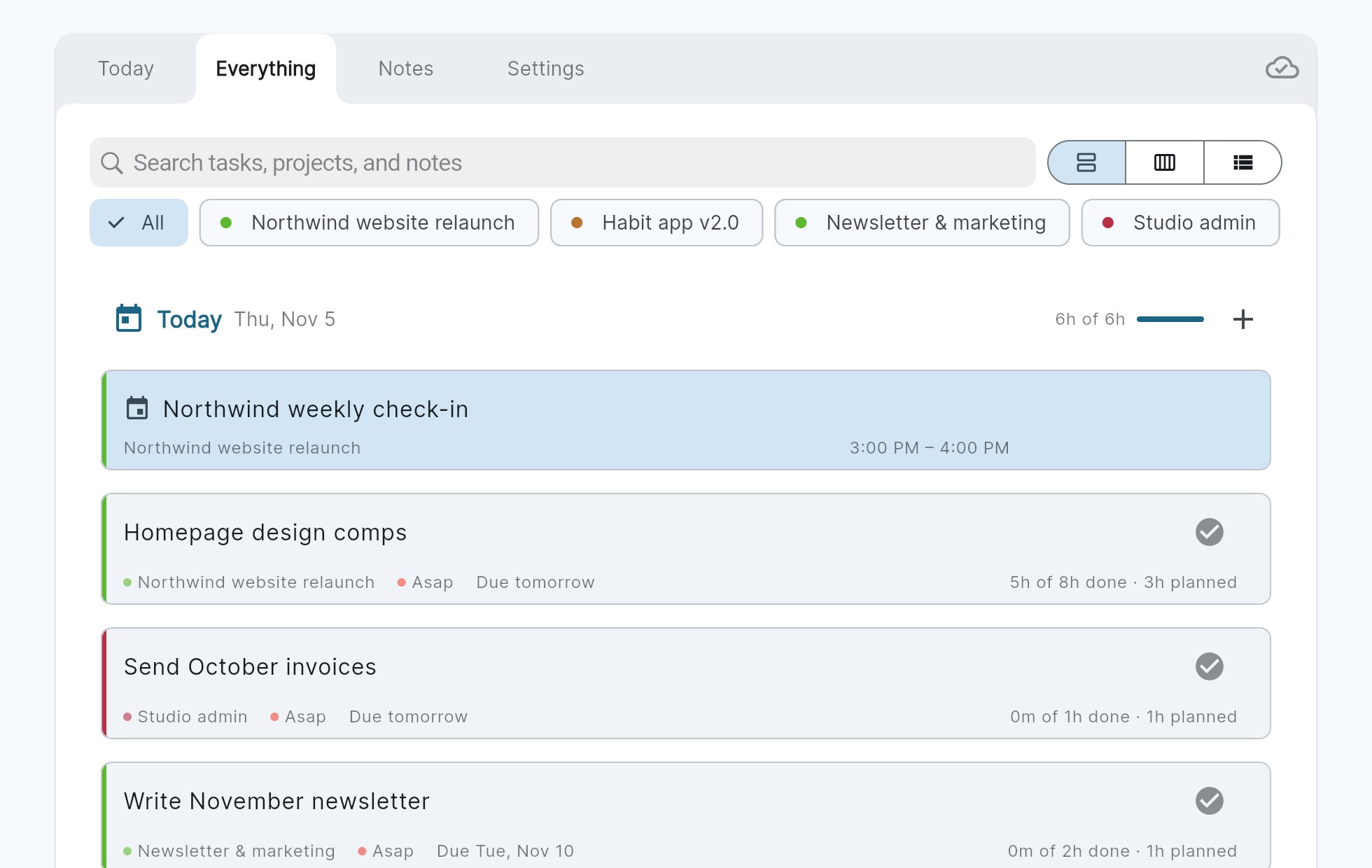
See every day ahead
The Everything view lays out your schedule day by day, as a week, or as one prioritized list. Filter by project or search across tasks, projects and notes.
- Each day shows how full it is: "6h of 6h".
- Pin work to a specific day when you need to.
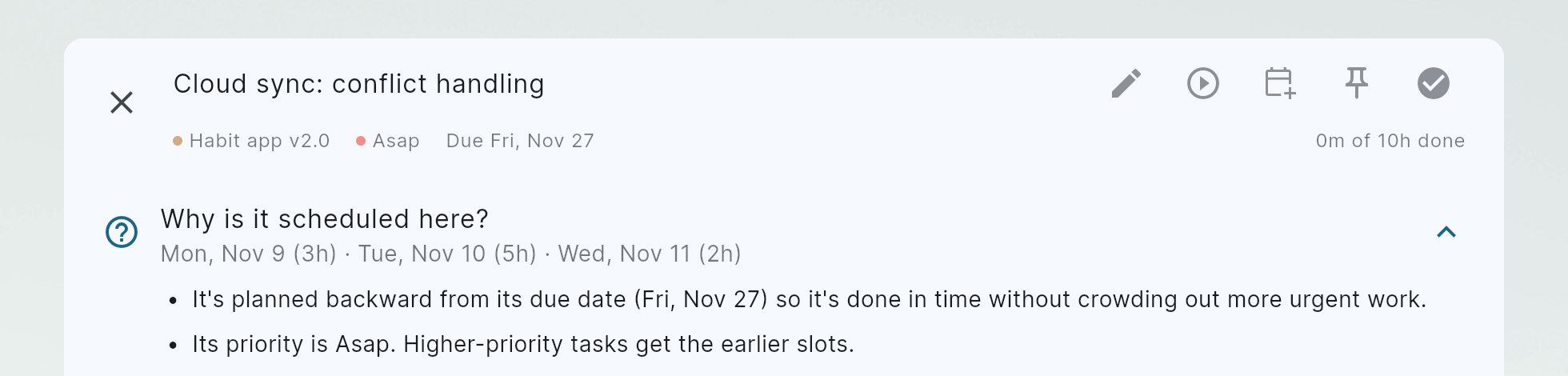
Know why everything is where it is
Open any task to see exactly when it's scheduled and why: what it's waiting on, which deadline it's working back from, and how priority and project limits shaped it.
- No black box. You can trust the plan because you can read it.
- Change an estimate or a due date and the whole schedule updates instantly.
Everything included
The details that make a schedule realistic
Deadlines that hold
Work is planned backward from each due date, so it finishes on time without crowding out urgent tasks.
Dependencies
A task that waits on another is scheduled after it, never before.
Meetings & days off
Fixed-time meetings shorten the day; holidays and time off are skipped entirely.
Recurring tasks
Weekly reports, monthly invoices, every second Tuesday. Set it once.
Time tracking
Run a timer or log hours. Estimates update as you go: "5h of 8h done".
Notes & checklists
Rich-text notes on every task, plus project notes and checklists for everything else.
Project limits
Cap a project at a few hours a day so one client doesn't eat your whole week.
Syncs everywhere
Runs in your browser and syncs in real time across your devices.
Pricing
One plan. Everything included.
Try it free for 14 days. Then pick monthly or yearly.
Monthly
$7 / month
Billed monthly
Start 14-day free trial- Automatic scheduling around deadlines, meetings and days off
- Unlimited projects, tasks and recurring tasks
- Daily planning, week view and task list
- Time tracking and notes
- Sync across all your devices
Yearly
Save $24 a year$5 / month
Billed $60 once a year
Start 14-day free trial- Automatic scheduling around deadlines, meetings and days off
- Unlimited projects, tasks and recurring tasks
- Daily planning, week view and task list
- Time tracking and notes
- Sync across all your devices
Prices in USD. Taxes may apply. Cancel anytime from Settings → Billing. See our refund & cancellation policy.
FAQ
Questions, answered
What happens when my free trial ends?
You choose monthly or yearly and keep going. If you don't subscribe, your account switches to read-only: nothing is deleted, and you can subscribe later to pick up where you left off.
Do I need a credit card to start the trial?
No. Sign up with your email and use everything for 14 days.
Can I switch between monthly and yearly?
Yes, anytime from Settings → Billing. The change is prorated automatically.
What if I cancel?
Your subscription stays active until the end of the period you paid for. After that you keep read-only access to your projects, tasks and notes.
Is there a mobile app?
My Next Thing runs in any modern browser and syncs across your devices in real time. Native apps may come later.
How is my data handled?
Your data is stored with our hosting provider and is only visible to your account. Payments are processed by Stripe; we never see or store your card number. Details are in our Privacy Policy.
Something else? Email us. A real person replies.

Know your next thing, every day.
Set up your projects in a few minutes and let My Next Thing plan the rest.
Start your 14-day free trial